N° 01 / Featured
A lightweight desktop app for posture awareness while working at a laptop.
v0.4 · macOS

Neck Posture app.

Synopsis

A lightweight desktop app that helps you notice poor neck posture while working at your laptop.

Join full release waitlist Download beta for macOS
Join the waitlist for the signed Mac release, or try the current beta now.
Version
0.4 — Beta
Platform
macOS 13+
Size
~ 18 MB
Status
In development
01 · Demo

What you actually see.

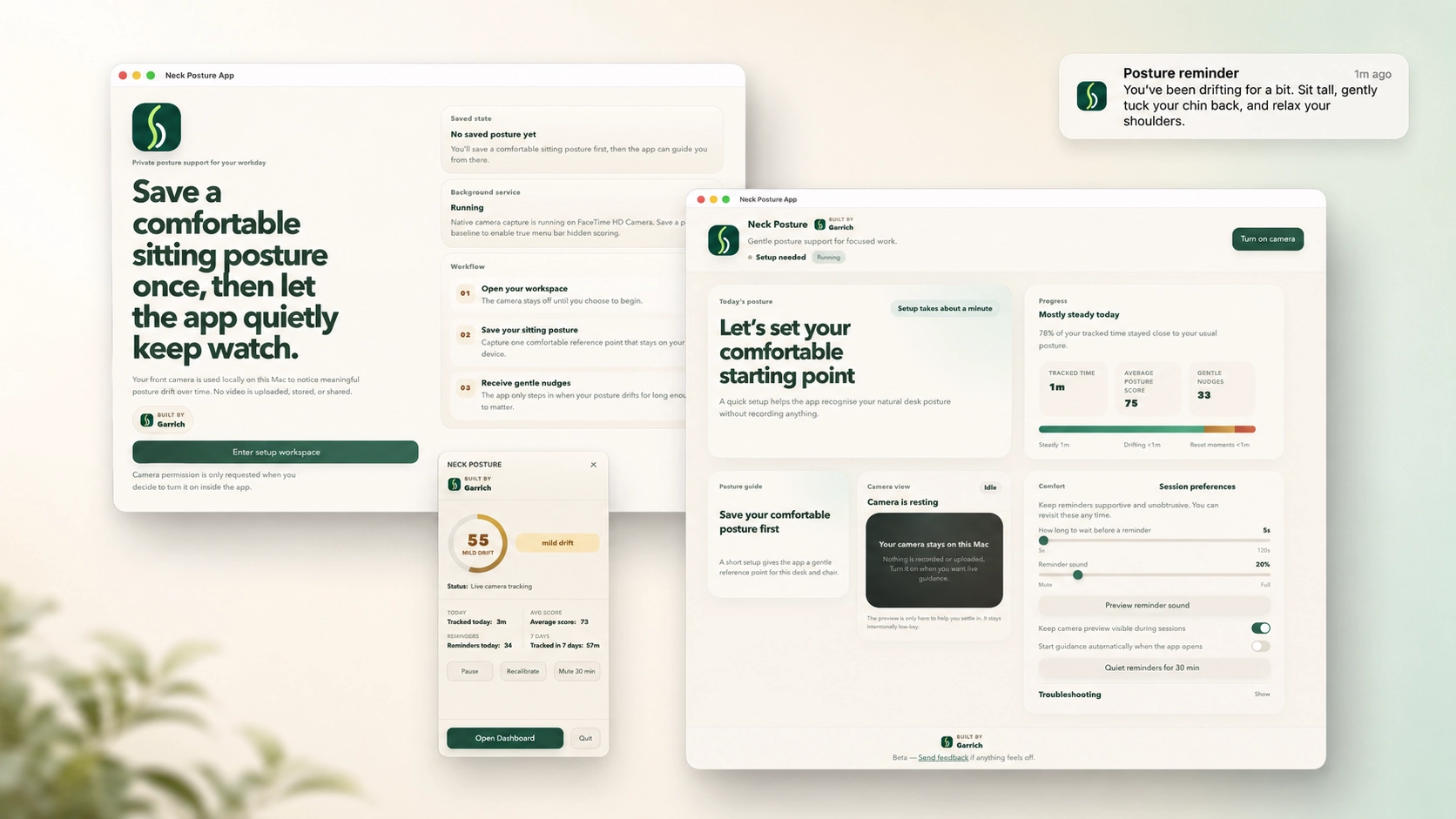
Neck Posture app interface
Fig. 02 — Product shot
Actual app UI
Neck Posture app product shot
02 · Mechanics

How it works.

01 / Detect

Detect.

Uses the laptop webcam to estimate posture signals. Processing happens on-device.

02 / Interpret

Interpret.

Looks for patterns that suggest forward head posture or a poor working position over time.

03 / Nudge

Nudge.

Sends a lightweight reminder when posture has been poor for too long. Easy to dismiss.

Note —This is awareness and habit feedback. The app does not diagnose, treat or fix posture issues. If you have ongoing pain or concerns, see a clinician.
03 · Download

Get the beta.

Download beta for macOS.

Universal build — runs natively on Apple Silicon and Intel Macs running macOS 13 (Ventura) or later.

Download beta v0.4 (.dmg)
v0.4 — Released May 2026~ 18 MB

Install.

How to install the beta on macOS

This beta is local-first and not yet notarized by Apple, so macOS asks you to approve it once.

  1. Open Neck Posture App_0.1.0_aarch64.dmg.
  2. Drag Neck Posture into your Applications folder.
  3. Open the app.
  4. Click Done.
  5. Open System Settings.
  6. Go to Privacy & Security.
  7. Click Open Anyway.
  8. Reopen the app.

After this, the app opens normally.

04 · Privacy

What happens with your camera.

A note

Camera processing happens locally on your device. No camera footage is uploaded.

Posture estimation runs on-device. Frames are processed in memory and discarded.
No video, no images and no biometric data leaves your machine.
Aggregate posture stats stay on your device unless you explicitly export them.
Camera access can be revoked at any time in System Settings → Privacy.
05 · Honesty

Known limitations.

What it isn't

This is a small experiment, not a medical product. A few honest caveats from current testing:

  1. 01Lighting matters. Detection accuracy varies under low light, strong backlight, or rapidly changing conditions.
  2. 02Camera angle matters. Tilted laptop lids and external webcams change the baseline; recalibrate when your setup changes.
  3. 03Calibration is per-session. If you start with bad posture, the app may treat that as your neutral. A reset button is one click away.
  4. 04It is not medical software. No diagnosis, no treatment, no clinical claims. If you have neck or upper-back pain, see a professional.
  5. 05Battery impact. Continuous webcam use draws power. The app sleeps when your laptop is idle, but expect some impact during long sessions.